How ScanOFe Works
From abnormal finding
to actionable intelligence
ScanOFe does not replace clinical judgment. It accelerates it. When a clinician identifies an abnormal finding, ScanOFe takes over the cognitive load of syndromic reasoning, presenting ranked differentials, associated genes, and targeted investigation pathways in real time.
Three Integrated Modes
One platform, three clinical workflows
ScanOFe is designed around the three decision points that matter most in a fetal medicine consultation: interpreting what you found, anticipating what you might find, and documenting it correctly.
01 / Forward Mode
Findings → Syndrome Intelligence
Enter one or more abnormal ultrasound findings. ScanOFe presents ranked syndrome differentials, associated gene panels, and targeted investigations. Structured by clinical priority.
Explore ↓02 / Reverse Mode
Syndrome → Ultrasound Checklist
Search by suspected syndrome or confirmed genetic condition. ScanOFe maps the expected prenatal phenotype. What to look for, at which gestational age, and in which organ systems.
Explore ↓03 / Reporting Module
Structured Report Generation
Generate scan reports with embedded growth curves, Doppler charts, and counseling notes. Templates cover FTS, anomaly scan, and third-trimester surveillance with risk stratification output.
Explore ↓When the scan shows something unexpected
Forward Mode is the primary workflow. When a clinician identifies one or more abnormal findings. A measurement below the 5th centile, a structural anomaly, an unexpected Doppler pattern. They enter those findings into ScanOFe and receive a prioritised, structured differential.
Clinical Scenario
"18-week anomaly scan. Agenesis of the corpus callosum detected with borderline ventriculomegaly and a small cerebellar vermis. Patient has no prior genetic history." → Enter 3 findings. ScanOFe returns ranked syndrome differentials, gene panels to consider, and whether chromosomal microarray alone is sufficient or exome is warranted.
Step 1. Enter abnormal findings
Select findings from a structured menu of fetal anatomy systems. Measurements trigger automatic centile alerts (<5th / >95th) with gestation-adjusted reference ranges.
Step 2. Receive ranked differentials
ScanOFe presents possible malformations first, then ranked syndrome associations. Rankings weight gestation, co-occurrence patterns, and phenotype prevalence in prenatal populations.
Step 3. Gene and investigation pathway
For each syndrome candidate: associated causative genes, recommended gene panels, and when exome sequencing is clinically justified versus unnecessary.
Step 4. Risk stratification and management
Risk level, suggested next steps, and counseling framework. Integrated into the reporting module for documentation.
Findings input → ranked syndrome differentials → gene and investigation pathway. All in a single interface without leaving the reporting workflow.
What ScanOFe does not do. And why that matters
ScanOFe never re-interprets ultrasound images. It never tells the clinician their finding is wrong. It never generates a diagnosis. It works with what the clinician has already identified and extends the thinking from that point. This design decision is not a limitation. It is a deliberate clinical philosophy.
ScanOFe accepts
Clinician-entered findings
Structural anomalies identified on scan
Measurement data and centile flags
Doppler waveform classifications
Known or suspected syndrome
ScanOFe generates
Ranked syndrome differentials
Phenotype maps for each syndrome
Gene-level linkage and panel guidance
Investigation recommendations
Structured scan reports
ScanOFe never does
Interpret raw ultrasound images
Override clinician findings
Generate a standalone diagnosis
Replace clinical judgment
Make treatment decisions
When you suspect a syndrome. Confirm what to look for
Reverse Mode addresses the second major clinical scenario: you have a suspected or confirmed genetic diagnosis. Perhaps from NIPT, family history, or prior pregnancy. And you need to know exactly what the ultrasound should show, and at what gestational age.
Clinical Scenario
"NIPT returns high-risk for Trisomy 18. Patient is 13 weeks. Detailed anatomy scan planned for 16 weeks." → Enter Trisomy 18 in Reverse Mode. ScanOFe returns a prenatal phenotype checklist: AVSD, choroid plexus cysts, rocker-bottom feet, overlapping fingers, IUGR pattern. With gestational age notes on when each finding is likely to become sonographically visible.
Step 1. Search by syndrome or condition
Enter a syndrome name, gene, chromosomal condition, or partial phenotype. ScanOFe searches a prenatal-specific database built from fetal medicine literature, not general genomics resources.
Step 2. Retrieve prenatal phenotype map
For each syndrome: the expected ultrasound markers, organised by anatomy system. Each marker includes gestational timing. When it typically becomes visible, and at what level of confidence.
Step 3. Missed-finding alerts
ScanOFe highlights findings that are frequently missed or seen only in specific gestational windows. Reducing the risk of incomplete phenotyping.
Syndrome search returns a prenatal phenotype map: what to look for, in which system, and at which gestational age. With missed-finding alerts.
Structured documentation built into the workflow
The Reporting Module generates structured scan reports from within the same session. No copy-pasting, no parallel documentation. Growth curves, Doppler charts, risk stratification output, and counseling notes are embedded in the report directly from the clinical session.
FTS. First Trimester Screening
NT, NB, ductus venosus, tricuspid regurgitation. Risk calculations for T21, T18, T13. Integrates with FMF risk model output.
Anomaly Scan. Second Trimester
Systematic anatomy documentation by organ system. Auto-flags abnormal measurements. Populates syndrome intelligence from Forward Mode directly.
Third Trimester. Growth & Doppler
Growth velocity tracking, Doppler waveform classification (UA, MCA, DV), FGR staging with color-coded alerts. Preeclampsia risk stratification.
Counseling Notes Section
Add free-text clinical notes and structured counseling documentation directly into the report. Printable with growth curves embedded.
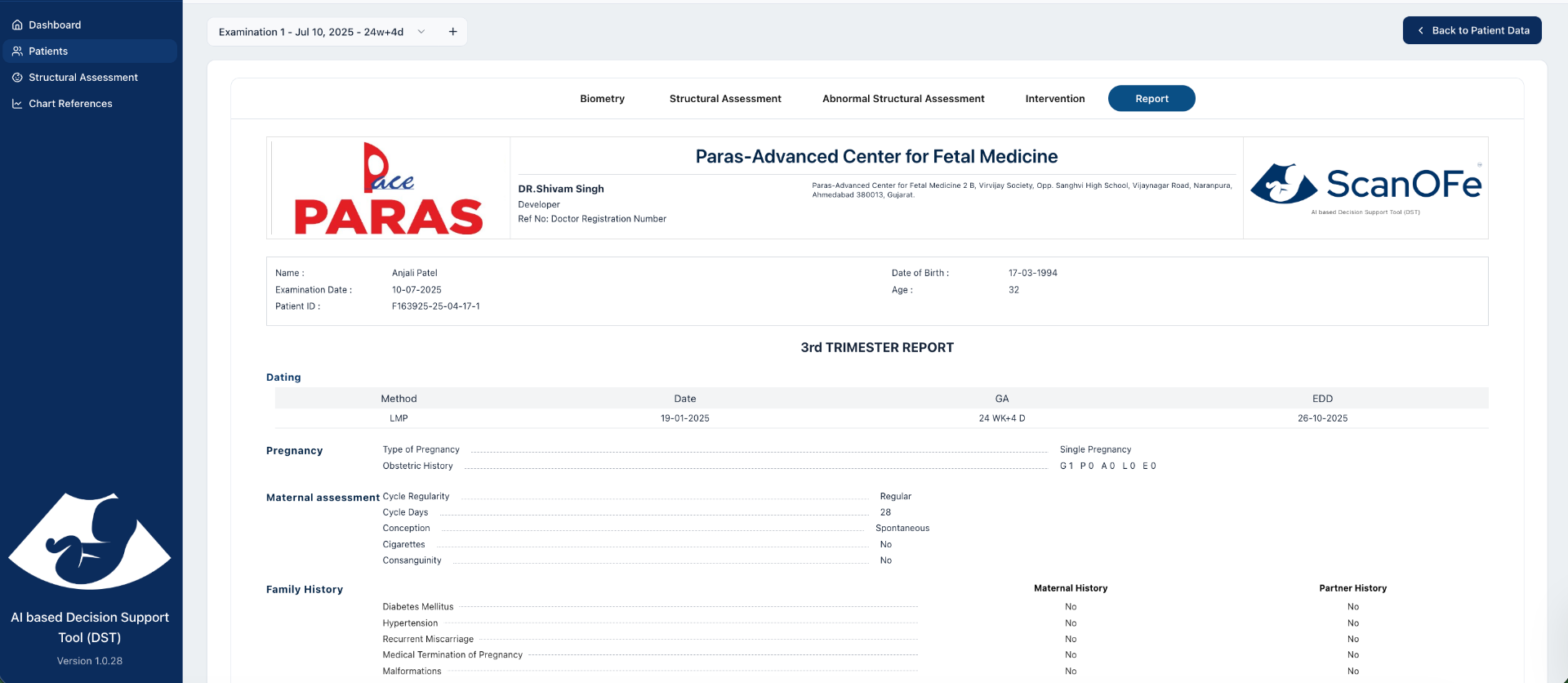
Reports are generated within the session. Growth curves, Doppler charts, risk output, and counseling notes are embedded directly. Print-ready output.
Deployment & Integration
Works with your existing setup
ScanOFe is platform-agnostic. It runs in any modern browser, on any operating system. No proprietary hardware, no software installation required. Access it from the reporting workstation beside the machine or from a tablet in the scan room.
Desktop & Laptop
Windows, macOS, Linux. Browser-based
- Full ScanOFe interface alongside your reporting station
- No software installation required. Browser access only
- Works with any EMR or reporting system open in parallel
- Consistent interface across operating systems
Tablet. Near-Machine Access
iPad, Android tablet. Any modern browser
- Use ScanOFe in the scan room while the patient is present
- Touch-optimised interface for anatomy system navigation
- DICOM transfer: ultrasound measurements auto-populate from machine
- Ideal for direct clinician use during the consultation
Ultrasound Machine Integration
Samsung, GE, Mindray, Sonoscape
- DICOM structured report support for measurement transfer
- Auto-populates biometry measurements into ScanOFe fields
- NT, NB, fetal biometry, and Doppler values transferred directly
- Reduces transcription errors in measurement-based analysis
Cloud-Based Access
No local data storage required
- Access from any internet-connected device
- Institutional accounts with multi-user access management
- Data privacy compliance. No patient data leaves your network
- Regular knowledge base updates without software re-deployment
Clinical Intelligence Layer
Why gestation-aware logic matters
A finding at 13 weeks carries different differential weight than the same finding at 22 weeks. Most clinical databases are not designed with this distinction built in. ScanOFe's knowledge base is structured around gestational timing. The same way a fetal medicine specialist thinks.
First Trimester (11–14 weeks)
NT, NB, ductus venosus, tricuspid regurgitation, early structural markers. ScanOFe applies FTS-specific phenotype weighting and integrates first trimester risk calculator output.
Second Trimester (18–24 weeks)
Full structural anatomy scan. Syndrome phenotypes have the highest resolution at this stage. Forward Mode applies anomaly-scan-specific weights to differential rankings.
Third Trimester (28+ weeks)
Growth surveillance, FGR classification, Doppler staging, preeclampsia risk. Late-presenting anomalies. ScanOFe flags which findings require reassessment at this stage.
See it in a real clinical scenario
We run 30-minute demo sessions with your actual scan protocol. Anomaly scan, FTS, or complex case. No slides, no product tour. Just the tool running through a real workflow.
Request a Demo
A 30-minute session using a real fetal medicine workflow. Anomaly scan, FTS, or a complex multi-anomaly case. We walk through the tool live, not a slide deck.
✓
Request received
We will confirm your demo session within 24 hours. Session runs 30 minutes via video call or in-person at your centre.